1
Chapter 5 – Connections
Chapter 5
Connections
This chapter provides instructions for making connections and
powering on the ExaSAN system.
After you have installed the necessary components, the ExaSAN system is ready to be
connected and powered on. Before powering on, you must do the following:
•
•
•
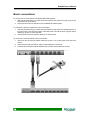
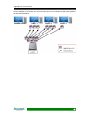
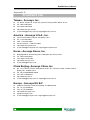
Connect the G1 PCIe switch(es) to ExaRAID HD RAID systems.
Connect the G2 PCIe switch to the G1 PCIe switch(es).
Connect the G2 PCIe switch to host servers.
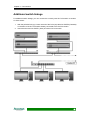
Once basic connections are made, you can also connect additional G1 PCIe switches for
maximum storage expansion. The ExaSAN system supports up to four G1 PCIe switches for
additional switch linkage.
21