1
Chapter 3
COMMAND LINE INTERFACE
The built-in user-friendly Command Line Interface (CLI) allows user to perform a full configuration of
the unit and read the statistics and alarm status. It is the most powerful tool to configure the unit. It makes
changes to all possible settings that system will not be able to determine automatically.
Note: The unit’s configuration that is set or modified through the CLI will be lost after unit’s reboot,
unless the saving operation is used to store a new setting in the unit’s configuration file.
The CLI commands also provide filing operations, which include:
• Downloading Software Images
• Saving into the configuration files the configuration parameters modified through the CLI.
3.1. Command Line Interface Convention
The following convention is implemented in FH915 Command Line Interface (CLI):
• The Carriage Return/Line Feed (CR/LF, 0x0D/0x0A) is a command delimiter. Command
delimiters CR or LF or CR+LF are valid. Preferable delimiter - LF.
• The Carriage Return/Line Feed (CR/LF, 0x0D/0x0A) is a reply delimiter followed by the “CLI>”
prompt if Echo option is On.
• The Carriage Return/Line Feed (CR/LF, 0x0D/0x0A) is a reply delimiter if Echo option is Off
(default option).
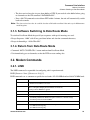
• The 2-digit number followed by “@” in the unit’s reply indicates the error code (refer to Table 31 for description), if Echo Off is selected.
• A successfully performed command is replied by @00 code, if Echo Off is selected.
• A command with the certain [Parameter Name] and blank [Parameter List] displays the current
settings for a given parameter.
• To set the mode ordered by CLI commands as permanent User Setting (the setting automatically
selected for the boot-up unit) the SAVE command must be asserted.
• [/?] orders to show the help information for the given command.
• Commands are not key sensitive; small, none capital characters can be used to enter CLI
commands.
Table 3-1. Command Line Interface Error Codes
Error Code
Short Description
0x01
Command Syntax Error.
0x02
The parameter has a format error.
www.arwestcom.com
21