1
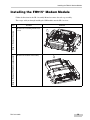
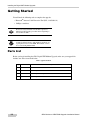
Installing the FH915+ Modem Upgrade
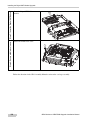
Step 5: Secure the module using
nuts and screws
Step 4: Place the modem module
onto the subassembly
Step 3: Connect the cable to
to the modem
Step
1-4
Procedure
Illustration
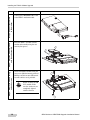
Connect the UMP/MMCX RA cable
to the FH915+ modem module.
Place the FH915+ module onto the
modem subassembly using the two
round nylon spacers.
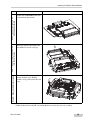
Secure the FH915+module using the
two screws (M2,0x8 metric pan head
Phillips) and the two nuts (M2 metric
hex nut stainless steel) provided.
NOTE
Before securing the FH
915+ module, make
sure the connectors are
completely aligned
with the modem.
GR-3 Modem to GSM/CDMA Upgrade Installation Manual