1
Command Line Interface
Command Line Interface Convention
3.1. Command Line Interface Convention
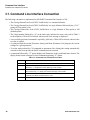
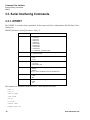
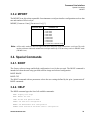
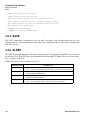
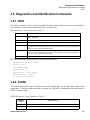
The following convention is implemented in AW200BT Command Line Interface (CLI):
• The Carriage Return/Line Feed (CR/LF, 0x0D/0x0A) is a command delimiter.
• The Carriage Return/Line Feed (CR/LF, 0x0D/0x0A) is a reply delimiter followed by the “CLI>”
prompt if Echo option is On.
• The Carriage Return/Line Feed (CR/LF, 0x0D/0x0A) is a reply delimiter if Echo option is Off
(default option).
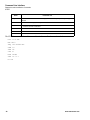
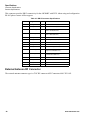
• The 2-digit number followed by “@” in the unit's reply indicates the error code (refer to Table 3
for description), if Echo Off is selected, otherwise the error message is displayed.
• A successfully performed command is replied by @00 code, if Echo Off is selected, otherwise the
set value is replied.
• A command with the certain [Parameter Name] and blank [Parameter List] displays the current
settings for a given parameter.
• To set the mode ordered by CLI commands as permanent User Setting (the setting automatically
selected for the boot-up unit) the SAVE command must be asserted.
• A command followed by “/F” option displays the Parameters in the predefined frame format. The
display frame format is unique for each command supporting “/F” option.
Table 3-1. Command Line Interface Error Codes
Error Code
28
Short Description
0x01
Command Syntax Error. A command followed by “/?” displays a command usage.
0x02
The parameter has a format error. A command with the certain [Parameter Name]
followed by “/?” displays the format and range of the variable.
0x03
The parameter is out of allowed range. A command with the certain [Parameter
Name] followed by “/?” displays the format and range of the variable.
0x04
The command is not valid for specific radio model. To display the list of available
commands, the HELP command must be used.
0x05
Unspecified Error
www.arwestcom.com