1
Operation
5.1.3
Diagrams
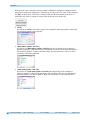
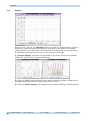
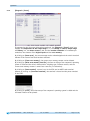
When the drive is moving, the [Diagrams] menu item records the respective motor current in
mA (green), the position (blue) and speed (red) at intervals of 60 seconds. The maximum
recording period is 15 minutes. With recordings longer than 60 seconds, the next period can
be selected by clicking on the arrow [<] or [>] or moving the slider [[]].
By [Compress diagram], all periods are represented in one picture without loss of detailed
information. The time scale is adjusted accordingly.
By clicking on [Print], the printer setup of the computer’s operating system is called and the
activated window (compressed or single period) can be printed.
By clicking on [Delete diagram], the complete record is deleted. Deleting is possible anytime.
ProTool DriveLine
Date: 13-08-2014
Art. no. 87891
Rev. status 310/14
Page 13 of 16