1
the number type. You can state the name and number type of the
contact (for example, “Call John Work”) to access the contact’s
phone number directly.
Send <Message Type>: To create a message, say “Send,” and
the command system will prompt you for the type of message you
want to send: Text, Picture, Video or Voice. You can state the name
and number of the contact, the message type, and the contact
name, number, or group (for example, “Send text message to Bob”)
and the message will automatically start.
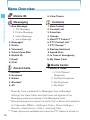
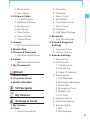
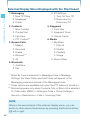
Go To <Menu>: The “Go To” command allows you to access a
menu within the handset (for example, “Go to Contacts”). If no
menu option is stated, a list of options will be provided. Choose
from the following: Alarm Clock, Bluetooth Menu, Calculator,
Games, Messaging, Missed Calls, Mobile Web, Music & Tones,
My Music, My Verizon, My Pictures, My Ringtones, My Sounds, My
Videos, New Contact, New Picture Message, New TXT Message,
New Video Message, Phone Settings, Recent Calls, Settings &
SETTINGS & TOOLS
Calendar, Call Settings, Contacts, Display Settings, Media Center,
Tools, Sound Settings, Tools, and V CAST Videos.
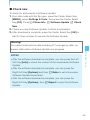
Check <Item>: The “Check” command allows you to access
device information including the Status, Voicemail, Messages,
Missed Calls, Time, Signal Strength, Battery Level, Volume, and
Minutes (for example, “Check Battery”). If no menu option is stated,
a list of options will be provided.
Contact <Name>: The “Contact” command allows you to access
information for a contact. For example, saying, “Contact Bob
Smith,” will provide all entered information for that contact.
Redial: The “Redial” command allows you to make a call to the last
number that you called.
Play <All Songs/Playlist name>: The “Play” command allows you
to play all your songs by stating “Play All Songs,” or play individual
playlists by saying “Play” followed by the playlist name.
117