1
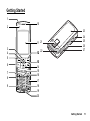
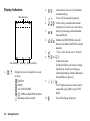
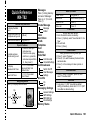
12.Right Soft Key: C
Executes the function in the lower right of the
screen.
Accesses “FET Mobile Internet” by opening the
browser in stand-by.*
13.End/Power Key: F
Ends a call and turns power on/off.
14.Audiovisual Key: T
While in stand-by:
Relaunches the corresponding player if playing
music and FM Radio in the background.
Displays Multimedia menu if not playing.
15.Clear/Back Key: U
Clears the characters before the cursor, returns to
the previous screen, etc.
16.Message Key: E
Displays Messaging menu.
17.Keypad
18.#/Silent Key: R
Displays symbol screen on the text entry screen.
Long press to switch languages on the text entry
screen.
Long press in stand-by to switch Profiles settings
between the mode most recently activated and
Silent mode.
19.Microphone
20.External Connector:
Used to connect either the charger or a USB data
cable.
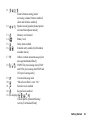
21.Main Camera
22.Built-in Aerial:
Warning: Do not cover the top of the phone with
your hand when in use as this may interfere with the
performance of the built-in aerial.
23.Battery Cover
24.Camera Key: X
Long press in stand-by to activate the camera.
Takes a picture or starts recording video when the
camera is active.
Getting Started
13