1
The PMA8000-SR-has an automatic selector mode. Audio from the selected
transceiver is automatically heard in the headsets and speaker (if selected). You
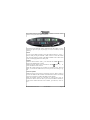
can check this function by switching from COM 1 transmitter to Com 2 transmitter by pressing the COM 2 transmitter selector pushbutton. Note that the associated Com 2 receive pushbutton indicator light that is located immediately above
the Com 2 transmitter pushbutton turns green. This guarantees that the pilot will
always hear the audio from the transceiver selected for transmit.
The PMA8000-SR “remembers” the receiver selection, so that when switching
transmitters from COM 1 to COM 2, if COM 2 audio was previously selected,
COM 1 audio will continue to be heard. This eliminates the pilot from having to
switch Com 1 audio back on, after changing transmitters.
When switching from COM 1 to COM 2 while Com 2 was not previously selected, COM 1 audio will be switched off. In essence, switching the mic selector
will not override prior selection of COM receiver audio.
In normal (not split) modes, the PMA8000-SR gives priority to the pilot’s radio
Push-To-Talk (PTT). If the copilot it transmitting, and the pilot presses his PTT,
the pilot’s microphone will be heard over the selected com transmitter.
In TEL mode, the pilot microphone and headphones are connected to the cell
phone. The pilot PTT will switch the pilot mic to the selected com transceiver,
allowing continued aircraft communications.
The copilot will also be able to transmit on the other selected radio with his PTT
as well.
Split Mode
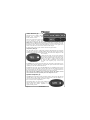
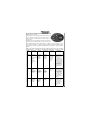
The split mode is activated at any time by pressing the COM 1 and COM 2 XMT buttons at the
same time. This places the pilot on COM 1 and
the Copilot on COM 2.
Pilot on COM 2 and Copilot on COM 1 is not possible.
NO TE: Due to the nature of VHF communications signals, and the size
constraints in general aviation aircraft, it is probable that there will be
some bleed-over in the Split mode, particularly on adjacent frequencies.
PS Engineering makes no warranty about the suitability of Split Mode in
all aircraft conditions.
Note: Split Mode does not turn off Nav, ADF, or AUX selected audio to pilot.
However, the copilot will only hear the selected communications receiver.
Swap Mode (Switch from Com 1 to Com 2 remotely)
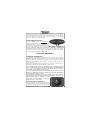
With a yoke mounted, momentary switch, the pilot can change from the current
Com transceiver to the other by depressing this switch. To cancel "Swap Mode,"
the pilot may either press the yoke mounted switch again, or select a different
Com with the XMT buttons.
R5 PMA8000-SR Pilot Guide
202-880-0000
Page 3