1
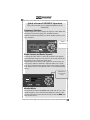
Push/hold for
more than one
second
Monitor Mode
When interfaced with the M760R VHF COM radio as Com 1, the standby
frequency can be monitored by holding the C2 Receive button for the Microair for more than one second (or until the indicator becomes active).
Intercom Operation (8)
IntelliVox® VOX-Squelch
No manual adjustment of the IntelliVox® squelch control is possible.
Through individual signal processors, the ambient noise appearing in all four
microphones is constantly being sampled. Non-voice signals are blocked.
When someone speaks, only their microphone circuit opens, placing their
voice on the intercom.
The system is designed to block continuous tones; therefore people humming
or whistling in monotone may be blocked after a few moments.
For consistent performance, any headset microphone must be placed within
¼-inch of your lips, preferably against them. (ref: RTCA/DO-214, 1.3.1.1
(a)).
NOTE
It is also a good idea to keep the microphone out of a direct wind path. Moving your head through a vent air stream may cause the IntelliVox® to open
momentarily. This is normal.
The IntelliVox® is designed to work with normal aircraft cabin noise levels
(70 dB and above). It loves airplane noise! Therefore, it may not recognize
speech and clip syllables in a quiet cabin, such as in the hangar, or without
the engine running. This is normal.
For optimum microphone performance, PS Engineering recommends installation of a Microphone Muff Kit from Oregon Aero (1-800-888-6910). This
Feb. 2011 PAR100EX Pilot Guide
202-760-0100
Page 5