1
PS Engineering
PMA8000-SR Audio Selector Panel and Intercom System
Installation and Operator’s Manual
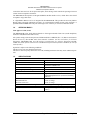
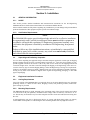
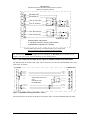
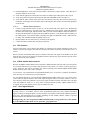
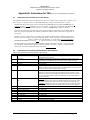
CREW: Pilot and copilot are connected on one intercom channel and have exclusive access to the aircraft
radios. They may also listen to Entertainment 1. Passengers can continue to communicate with themselves
without interrupting the Crew and may listen to Entertainment 2.
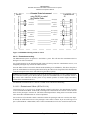
3.6.3.1 Entertainment Input
As shipped from PS Engineering, the PMA8000-SR is configured to provide Sirius Satellite Radio to the
Entertainment #1 circuit, for Pilot and Copilot. Since the audio selector panel has provisions for two separate entertainment inputs, which operate independently the Sirius Radio audio can be directed to the passengers. The front panel volume control does not affect the music level. Music 2 feeds the passengers.
Passenger music also operates independently from the crew (music 1).
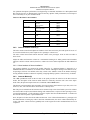
While in the ISO (Isolate) mode, the copilot will hear Entertainment 1 while the four passengers will hear
Entertainment #2. The pilot will hear entertainment 1, at a very muted level. The music will automatically
mute when either the copilot or passengers speak and then will gradually return to the original listening
level when the intercom or radio conversation ceases. Pilot will not mute the music while in ISO mode if
he presses the PTT switch to transmit or if he speaks while on the phone.
When in the ALL mode, pilot and copilot hear Entertainment 1 input, while all passengers hear the Entertainment 2 source. Music 1 will mute, or can be placed in Karaoke mode by pressing the “Mute” (6)
pushbutton. The passengers can disable their music muting with an external switch that may have been
installed during installation.
While in the CREW mode, pilot and copilot will hear entertainment input #1 while the passengers will listen
to entertainment input #2.
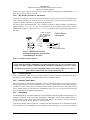
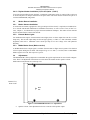
3.6.3.2 Soft Mute and Soft Mute inhibit for Karaoke Mode
The Soft Mute feature assures that the aircraft radio transmissions will not be missed due to entertainment
playing. When there is radio reception or intercom conversation, the music level is dropped to a low, or
background level. When the radio or intercom traffic ceases, the level gradually returns to normal.
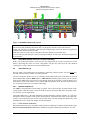
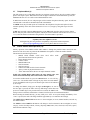
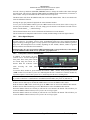
The “Mute” pushbutton switch, (6) controls muting of entertainment source #1 (for pilot and copilot).
Pushing this button places music input 1 into Karaoke (or sing along) mode. This allows the music to continue uninterrupted by intercom or radio traffic when cockpit workload is appropriate. Pushing the button
again will release the mute inhibit function.
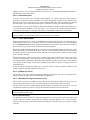
The passenger music, source #2, can be placed in the Karaoke mode by pressing the AUX button, if wired
to AUX logic output, or if a remote switch is installed in the aircraft. See wiring information for details.
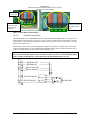
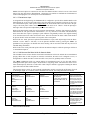
Mode
Isolate
Pilot Hears
A/C Radios
Pilot Sidetone
(during radio transmission)
Entertainment 1 is
Muted
Copilot Hears
Copilot and passenger
intercom
Entertainment #1
Passenger Hears
Passenger and Copilot
intercom
Entertainment #2
Telephone
“Phone Booth” mode
Pilot has exclusive use of
the telephone.
In TEL, Pilot connected to
selected COM for PTT TX
and receive.
All
Pilot
Copilot
A/C Radio
Passengers
Entertainment #1
Copilot
Pilot
A/C Radio
Passengers
Entertainment #1
Passengers
Pilot
Copilot
A/C Radio
Entertainment #2
All have access to phone .
Crew
Pilot
Copilot
A/C Radio
Entertainment #1
Copilot
Pilot
A/C Radio
Entertainment #1
Passengers
Entertainment #2
Pilot and copilot have phone
access.
Comments
This mode allows the
pilot to communicate
without the others bothered by the conversations. Copilot and passengers can continue to
communicate and listen
to music
This mode allows all on
board to hear radio reception as well as communicate on the intercom. Music and intercom
is muted during intercom
and radio communications
This mode allows the
pilot and copilot to concentrate on flying, while
the passengers can
communicate amongst
themselves.
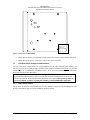
Table 3-2 Intercom Modes
200-880-0000
Page 3-5
Rev. 13, July 2006