1
KVM Switch User’s Guide
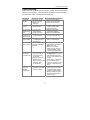
Use <F1>: Setup\Position to
OSD menu is
z OSD menu has fixed
move OSD menu and banner
not at the
resolution and its size
to proper position.
proper position
varies due to computer
VGA resolution
changes.
Can not select z Improper Master unit z Only Master PC port
can be connected to slaves.
connection
a computer
z Connect slave CONSOLE
connected to a z Improper slave unit
port to PC ports of the Master
connection
slave
z Only two level of slave units is
z Too many levels of
allowed. Pop up OSD again
slaves
to check if Master recognizes
the slave connection. Look
for plus (+) mark and the
number in OSD menu.
z Computers do not
z Make sure a power adapter
The KVM
supply enough power.
with minimum of 9V 500mA
Switch fails to
output rating is firmly
function
connected to the power jack.
occasionally.
Limited Warranty
IN NO EVENT SHALL THE DIRECT VENDOR'S LIABILITY
FOR DIRECT OR INDIRECT, SPECIAL, INCIDENTIAL OR
CONSEQUENTIAL DAMAGES, LOSS OF PROFIT, LOSS OF
BUSINESS, OR FINANCIAL LOSS WHICH MAY BE CAUSED
BY THE USE OF THE PRODUCT EXCEEDS THE PRICE
PAID FOR THE PDOCUDT.
The direct vendor makes no warranty or representation, expressed or implied with
respect to the contents or use of this documentation, and especially disclaims its
quality, performance, merchantability, or fitness for any particular purpose.
The direct vendor also reserves the right to revise or update the product or
documentation without obligation to notify any user of such revisions or updates. For
further information, please contact your direct vendor.
All the brand names and registered trademarks are the property of their respective
owners.
28