1
Racelogic Upgrader
Software overview
Racelogic Upgrader software is used to upgrade firmware in a number of Racelogic products.
The latest version of Upgrader software can be found on the Racelogic website on the software downloads page.
Load the latest version onto your PC by downloading the setup installer then follow the on-screen prompts.
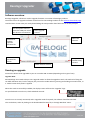
Use the Options menu to
select the COM port which
the device is connected to
Starts upgrade
process
Closes the
software
Click here to
load the
required
firmware file
Loaded
firmware file
details
COM port
number being
‘viewed’
Check software version
Running an upgrade
Connect the device to be upgraded to your PC via either USB or RS232 (depending on the type of unit).
Upgrader Mode
Most Racelogic units need to be put into ‘upgrader mode’ to allow the upgrade to work. The method of doing this
can differ between units, but the majority are put into this mode either by pressing and holding an arrow button, or
a ‘mode’ button while power is applied.
When this mode is successfully enabled, the display screen will show the ‘upgrader’ logo.
For specific details on each unit, check individual manuals.
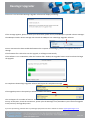
Once the unit is correctly connected, and in upgrader mode if required, the software should be launched.
This can be done, either by clicking on the downloaded firmware file, or through Windows’ menu.
August 2011
Oct 2011
01/11/2011