1
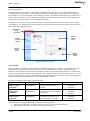
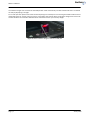
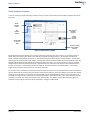
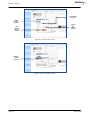
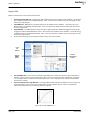
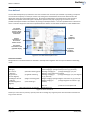
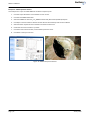
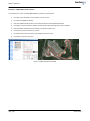
SatGen v3 Manual Import File SatGen v3 allows for the import of three file format: Load Google Earth KML File -. Google Earth files in KML format can be loaded into the software. The Position (x,y) and Speed profile is immediately displayed. Date, Time, Dynamics, update rate and mask angle can bet set to users requirements. Load NMEA File - NMEA Files in the $GGA format can be loaded into the software. The Position (x,y) and Speed profile is immediately displayed. Date, Time, (not dynamics), update rate and mask angle can bet set to users requirements. Load VBOX File - The VBOX product range a number of high specification GNSS data loggers from Racelogic ranging from 5Hz to 100 Hz VBOX files in the *.vbo format can be loaded into the software. The Position (x,y) and Speed profile is immediately displayed. Date, Time, (not dynamics), update rate and mask angle can bet set to users requirements. For test scenario files go to the examples sections at the rear of the manual Load file buttons Coarser interpolation button Smooth NMEA button Figure 10: Import file screen Smooth NMEA data - This must be ticked before the NMEA file is loaded, this will then apply smoothing to the data to give a more accurate representation when noise is encountered in the original data. See figure 13: The original data in red and the smoothed data in blue. This is displayed in the scenario details section once the file is loaded. Coarse interpolation for large KML files - Very large KML files will exceed the software’s memory limits and cannot be loaded. If this occurs tick this radio button and the software will use a coarser interpolation method reducing the size of the memory allocation required. Figure 11: Smooth NMEA data Page | 13 23 July 2014