1
Using the HP DesignJet 750C or
750C Plus Plotter with
Intergraph MicroStation PC
Introduction . . . . . . . . . . . . . . . . . . . . . . . . . . . . . . . . . . . . . . . . . . .
Before You Begin . . . . . . . . . . . . . . . . . . . . . . . . . . . . . . . . . . . . . .
Connecting the Device to Your Computer . . . . . . . . . . . . . . . . . . .
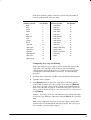
Configuring MicroStation . . . . . . . . . . . . . . . . . . . . . . . . . . . . . . . .
Activating the Configuration Utility . . . . . . . . . . . . . . . . . . . . .
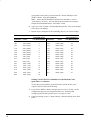
Selecting the Device . . . . . . . . . . . . . . . . . . . . . . . . . . . . . . . . .
Customizing the Driver . . . . . . . . . . . . . . . . . . . . . . . . . . . . . . .
Generating a Plot . . . . . . . . . . . . . . . . . . . . . . . . . . . . . . . . . . . . . . .
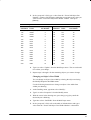
Plotting to a File . . . . . . . . . . . . . . . . . . . . . . . . . . . . . . . . . . . .
Sending the File to the Device (Bi-Tronics/Centronics) . . . . .
Sending the File to the Device (RS-232-C) . . . . . . . . . . . . . . .
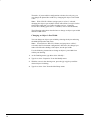
Plot Options . . . . . . . . . . . . . . . . . . . . . . . . . . . . . . . . . . . . . . . . . . .
Using the Device’s Rotate Feature . . . . . . . . . . . . . . . . . . . . . .
Producing Long-Axis Plots . . . . . . . . . . . . . . . . . . . . . . . . . . . .
Generating Multiple Copies of a Plot . . . . . . . . . . . . . . . . . . . .
Stopping a Plot . . . . . . . . . . . . . . . . . . . . . . . . . . . . . . . . . . . . .
Further Reading . . . . . . . . . . . . . . . . . . . . . . . . . . . . . . . . . . . . . . . .
3
3
4
4
4
4
5
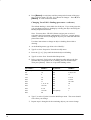
6
6
7
7
8
8
9
9
9
9
Introduction
This section describes how to connect your HP DesignJet 750C or 750C
Plus plotter (HP part numbers C3195A/C3196A and C4708A/C4709A) to a
PC running MicroStation PC software by Intergraph.
Read all the instructions and perform each step in this section in the order
given. You’ll learn how to:
•
•
•
Connect the device to your computer
Set up the MicroStation PC software
Generate a plot or print file and send it to the device.
Before You Begin
Here’s a list of things to do before proceeding with the instructions in this
section:
•
•
Install MicroStation PC on your computer, and
Set up the HP DesignJet 750C or 750C Plus Plotter using the
instructions in the HP DesignJet 750C Plotter User’s Guide or the HP
DesignJet 750C Plus Plotter User’s Guide, except skip the part about
connecting the device to your computer. Before connecting the plotter
or printer, first read the section in this document entitled “Connecting
the Device to Your Computer.”
3