1
CD Player (continued)
E
N
G
L
I
S
H
CD Changer Control
Notes on MP3/WMA (continued)
13
CD changer functions are designed for optional
Panasonic CD changer unit.
❐ Recording MP3/WMA files on a CD-media
≥ You are recommended to minimize the chances
of making a disc that contains both CD-DA files
and MP3/WMA files.
≥ If CD-DA files are on the same disc as MP3 or
WMA files, the songs may not play in the intended order, or some songs may not play at
all.
≥ When storing MP3 data and WMA data on the
same disc, use different folders for each data.
≥ Do not record files other than MP3/WMA files and
unnecessary folder on a disc.
≥ The name of MP3/WMA file should be added by
rules as shown in the following descriptions and
also comply with the rules of each file system.
≥ You may encounter trouble in playing MP3/WMA
files or displaying the information of MP3/WMA
files recorded with certain writing software or CD
recorders.
≥ The file extension “.mp3” or “.wma” should be
assigned to each file depending on the file format.
≥ This unit does not have the play list function.
≥ Although Multi-session recording is supported,
the use of Disc-at-Once is recommended.
Supported file systems
ISO 9660 Level 1/Level 2, Apple Extension to ISO
9660, Joliet, Romeo
Note:
≥ Apple HFS, UDF 1.50, Mix CD (CD Extra) is not
supported.
Preparation:
≥ Connect the CD changer, and load a magazine
(CDs).
Note:
≥ The power will be turned on automatically when
a magazine is loaded.
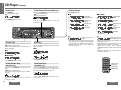
Changer Mode
1 CD
(When a CD changer is connected and a
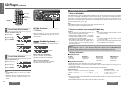
Bit rate
VBR
Sampling frequency
MPEG 1 audio layer 3 (MP3)
32 kj320 kbps
Yes
32, 44.1, 48 kHz
MPEG 2 audio layer 3 (MP3)
8 kj160 kbps
Yes
16, 22.05, 24 kHz
Windows Medio Audio Ver. 2, Ver. 8
64 kj192 kbps
No
32, 44.1, 48 kHz
≥ The following functions are not supported during playback through a CD changer.
• CD-ROM, CD-RW playback
• CD text display
• MP3/WMA playback
• Pause
≥ In principle, CD-R disc play is supported but it
does not follow that it will be possible to play all
such discs properly.
CD changer mode display
Lights when the changer is connected.
Press [SRC] (source) to change to CD
changer mode.
Playback starts automatically.
Track number
Note:
Disc number
Playing time
POWER
Load a magazine
with CDs.
Magazine is ejected in the CD
changer mode.
[SOURCE]
SOURCE
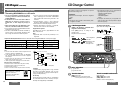
❐ Folder selection order/file playback order (example)
Maximum number of files/folders:
≥ Maximum number of files/folders: 999 (filesifolders)
≥ Maximum number of files in one folder: 255
≥ Maximum depth of trees: 8
≥ Maximum number of folders: 255 (Root folder is included.)
Windows Media, and the Windows
logo are trademarks, or registered
trademarks of Microsoft
Corporation in the United States
and/or other countries.
28
CQ-DP383U
MENU
SEL
NUMBER
MUTE
[6] [5]
(track)
1
2
3
SCAN
REP
4
5
6
7
8
6
9
5
0
DISP
SET
Car Audio
1
VOL
#
RAND
BAND
Note:
≥ This unit counts the number of folders irrespective of the
presence or absence of MP3/WMA file.
≥ If the selected folder does not contain any MP3/WMA
files, the nearest MP3/WMA files in the order of playback
will be played.
≥ Playback order may be different from other MP3/WMA
players even if the same disc is used.
≥ “ROOT” appears when displaying the root folder name.
14
magazine is in the changer.)
Compression formats (Recommend: “Points to remember when making MP3/WMA files” on the previous page)
Compression method
E
N
G
L
I
S
H
["] [#] (disc)
Root folder (root directory)
2
Folder selection
In the order 1 to
1
[
4
3
3
[
2
[
6
File selection
In the order
[
1
to
[
4
5
6
Tree 1
Tree 2
4
[
Tree 3
.....Tree 8 (Max.)
Copyright
It is prohibited by copyright laws to copy, distribute
and deliver copyrighted materials such as music
without the approval of copyright holder except enjoying yourself personally.
No warranty
Above description complies with our investigations
as of December 2002. It has no warranty for reproducibility and displayability of MP3/WMA.
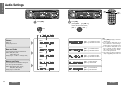
Selection
2 Disc
["]: Next disc.
[#]: Previous disc.
Selection
3 Track
[9]: Next track.
[:]: Beginning of the current track.
For the previous track, press twice.
Fast Forward/Fast Reverse
Press and hold.
[9] (5): Fast forward.
[:] (6): Fast reverse.
Release to resume the regular play.
CQ-DP383U
29