1
E
N
G
L
I
S
H
Installation Guide (continued)
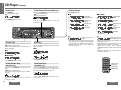
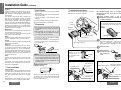
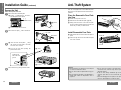
Anti-Theft System
Remove the Unit
31
Switch off the power of the unit.
This unit is equipped with a removable face plate.
Removing this face plate makes the radio totally inoperable.
the removable face plate.
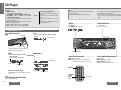
1 Remove
1 Press ['] (release button). The remov-
Place the Removable Face Plate
into Case
able face plate will be opened.
[']
(release button)
2
1 Press.
Contact
E
N
G
L
I
S
H
32
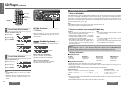
7 Removable face plate case
1 Switch off the power of the unit.
2 Remove the removable face plate. (page 46)
3 Gently press the bottom of the case and open
the cover. Place the face plate into the case and
take it with you when you leave the car.
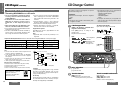
2 Pull on the right side of the unit.
2 Remove the trim plate 8 with a screwdriver.
Install Removable Face Plate
8 Trim plate
Screwdriver
1
1 Slide the left side of the removable face plate in
place.
2 Press the right end of the removable face plate
until “click” is heard.
2
Plastic tab
1
2
the lock cancel plates 9 along
3 1 Insert
the grooves on both sides of the main
Cut out
unit until “click” is heard.
2 Pull out the unit while pushing the
1 Insert.
plates further inside.
9 Lock cancel plate
Insert the tab
end in the outer
groove.
“Click”
4
46
Remove the unit by pulling with both hands.
CQ-DP383U
2 Pull out.
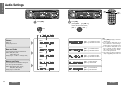
Caution:
≥ This face plate is not waterproof. Do not expose
it to water or excessive moisture.
≥ Do not remove the face plate while driving your
car.
≥ Do not place the face plate on the dashboard or
nearby areas where the temperature rises to
high level.
≥ Do not touch the contacts on the face plate or
on the main unit, since this may result in poor
electrical contacts.
≥ If dirt or other foreign substances get on the
contacts, wipe them off with a clean and dry
cloth.
≥ To avoid damaging the front panel, do not push
it down or place objects on it while it is open.
CQ-DP383U
47