1
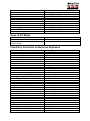
Function
Save file (without closing it)
Open file from Editor
Open file in read-only mode
Switch to next file
Switch to previous file
Save and close file
Suspend Editor
Editor's Setup menu
Status display
Switch to PC Mode
Help
Keys
Chord s (SPC+2 3 4)
Chord o (SPC+1 3 5)
Chord O (SPC+1 3 5 7)
SPC+5 6 8
SPC+2 3 7
Chord e (SPC+1 5)
SPC+1 2 3 4 5 6
Chord u (SPC+1 3 6)
Chord S (SPC+2 3 4 7)
Chord p (SPC+1 2 3 4)
Chord h (SPC+1 2 5)
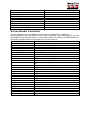
Keys in PC Mode
Function
Return to menu
Switch between Braille display and status
module display
Keys
Hold down SPC+1 3 4 about half a second
SPCL+SPCR
Fixed Key Functions on External Keyboard
Function
Switch external keyboard to PC
Entire Braille display line to left
Entire Braille display line to right
Cursor to top of file
Cursor to end of file
Toggle between insert and overstrike
Delete current character
Delete character left of cursor
Set beginning of block
Copy block
Cut block
Delete block (without copying)
Paste block
Exchange mark and cursor
Status display
Incremental forward search
Incremental backward search
Forward search and replace
ESC function
Navigation
Cursor to previous word
Cursor to next word
Cursor to previous sentence
Cursor to next sentence
Cursor to beginning of line
Cursor to end of line
Set mark
Jump to mark
Switch to next file
Switch to previous file
Suspend Editor
Save file (without closing it)
Key/Key Combinations
Chord : (SPC+2 5)
Page up
Page down
Ctrl+Pos1
Ctrl+End
Insert
Delete
Backspace
Ctrl+Enter
Ctrl+c
Ctrl+x
Ctrl+X or backspace
Ctrl+v
Ctrl+Tab
Ctrl+S
Ctrl+f
Ctrl+F
Ctrl+r
ESC
Arrow keys
Ctrl+cursor left
Ctrl+cursor right
Ctrl+cursor up
Ctrl+cursor down
Pos1
End
Ctrl+M
Ctrl+m
ALT+Tab
ALT+Shift+Tab
Ctrl+Space
Ctrl+s