1
Fig. 3. Recipe screen
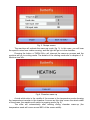
The machine will activate the warm-up mode (fig. 3). In this case, you will hear
the specific noise from turbine running, and the light will go on in the chamber.
Pressing the button <<TURN ON>> will interrupt the warm-up process and the
machine will go to cooling mode. The details of the cooling mode see in chapter «1.6.
Machine turn off».
Fig.4. Chamber warm-up
A wide white strip in the middle of the screen is the temperature scale showing
the temperature increase in the chamber. As soon as this strip covers the whole width
of the screen, the machine will switch to popping mode (fig. 5).
The sifter will automatically start rotating during chamber warm-up (the
temperature scale will cover around 80% of the screen width).