1
Table of Contents
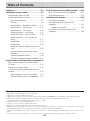
Introduction................................................................E-2
Setting before using a network.................................E-4
Simple Network Settings (via USB)............................ E-4
Making Detailed Settings (via LAN)............................ E-6
Basic Setting Operations..................................... E-7
CB Setup........................................................... E-9
Network Setting — Board/Printer Setting.......... E-11
Network Setting — Save Setting....................... E-13
Network Setting — SSL Setting........................ E-14
Administrator Menu — User Setting.................. E-15
Administrator Menu — Security Setting............ E-16
Administrator Menu — Disk management
Setting............................................................ E-17
Header/Footer.................................................. E-18
CB Information................................................. E-18
Writing Save Location Setting Information to IC
Card................................................................ E-19
Export and Importing Save Location Setting
Information...................................................... E-19
Resetting the Network Settings......................... E-20
Creating and Registering Headers and Footers... E-21
Using the Network board Connected to a Network.E-22
Saving scanned images on the network board or
FTP server............................................................. E-22
Printing out to a Network Printer............................. E-24
Transferring image files to/deleting them from the
computer............................................................... E-25
When the folder for saving is set to “Board”....... E-25
Deleting image files from the network board...... E-27
Using the Printer Server for PLUS Copyboard.........E-28
What is Printer Server for PLUS Copyboard?............ E-28
Operating Requirements......................................... E-28
Installation of the Software......................................E-29
Check Prior to Installation....................................... E-29
Installation of the Printer Server for PLUS
Copyboard............................................................. E-29
Cautions On Installation.................................... E-29
Uninstallation of the Printer Server for PLUS
Copyboard............................................................. E-30
Meaning of the Terms Used in this Manual
• Main unit (or set): This refers to the network board.
• USB memory: refers to USB flash memory.
• USB memory storage: means the saving of sheet surface data using MEMORY (i.e., the USB port) of the operation panel.
• Memory for computer storage: indicates a temporary saving location of the image that has been read.
• “copy”: Both “print” and “USB memory saving” mean to “copy.”
• “Sheet surface”: refer to the drawing portion.
• “Scroll” or “move”: indicates feeding of the sheet
• Memory for network storage: Memory used for network storage.
• Network: The communications network on which devices are interconnected in net fashion for communication (exchange of
data) between the devices. For this network board, the “network” indicates the LAN below.
• LAN (Local Area Network): A closed communications network for communicating within a restricted area, such as within a company.
• FTP (File Transfer Protocol): The protocol (communications rules) used when transferring files on a TCP/IP network.
E-3