1
Installation of the Software
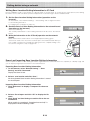
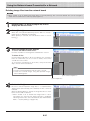
Follow the instructions of the installer and start
the installation.
Click “Finish”.
The “Installer Information Dialog Box” will be displayed.
Click “Finish”.
Uninstallation of the Printer Server for PLUS Copyboard
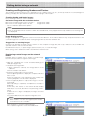
Selecting [Start] → [Control Panel] will display the Control Panel screen.
Double click “Add or Remove Programs or Applications” (this will differ depending on the
OS) to display the “Add or Remove Programs Properties” screen.
Select Printer Server for PLUS Copyboard among the list displayed and click [Change /
Remove] to display the Add or Remove wizard screen.
Selecting the [Remove] radio button of the wizard and clicking [Next] will start the uninstallation.
Note
• Each time the uninstaller is started, the User Account Control dialog box is displayed. Select “Continue” and continue with
the uninstallation.
E-30