1
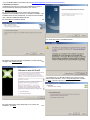
<<< 4.1.7 The DirectX setup wizard will finish installing the DirectX
components. Click Finish.
4.1.8 The installation is complete. Click Finish.
>>>
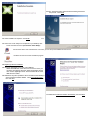
4.1.9 Two View Touch utility icons are placed on your desktop: View
Touch and View Touch Pen (see 5.3 View Touch Setup)
<<< Runs the View Touch Control Panel. From here, you can set up and calibrate the View Touch.
<<< Runs the View Touch Pen annotation program.
4.2 Digital Light Sensor installation
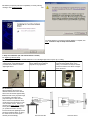
4.2.1 Plug the digital light sensor into a free USB port.
Should the USB cable of the sensor be too short to reach your
computer, the following have been tested successfully with the
View Touch’s digital light sensor: Powered USB hubs or Active
USB extension cables
4.2.2 Windows may either update the driver information automatically or
start Found New Hardware Wizard. Check Yes. This time only,
>>>
then click Next.
<<< 4.2.3 Check Install the software automatically, then click Next.