1
User Manual
Chapter III Accessing the Network Camera
3.1 Assigning An IP Address
The camera must be assigned an IP address to be accessible. The default IP address of Milesight
network camera is 192.168.5.190. The default user name is admin, and password is ms1234.
You can either change the IP address of the camera via IPCTools or manually. Please connect the
camera in the same LAN of your computer.
3.1.1 Assigning An IP Address Using IPCTools
IPCTools is a software tool which can automatically detect multiple online Milesight network
cameras connected in the LAN, set IP addresses, and manage firmware upgrades. It’s
recommended when assigning IP addresses for multiple cameras.
Step 1: Install IPCTools (The software could be downloaded from CD.)
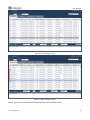
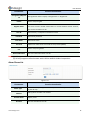
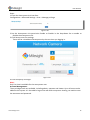
Step 2: Start IPCTools, and the device information including IP address, MAC address, Port number,
Netmask, and Gateway of all Milesight network cameras will be displayed. Details are
shown as Figure 3-1.
Figure 3-1
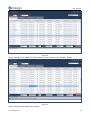
Step 3: Select a camera or multiple cameras according to the MAC address.
www.milesight.com
12