1
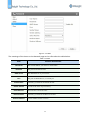
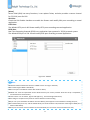
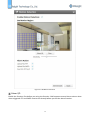
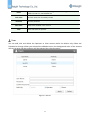
[More] Secure Shell (SSH) has many functions; it can replace Telnet, and also provides a secure channel for FTP, POP, even for PPP. SSH Port: Check the SSH Enable checkbox to enable the feature and modify SSH ports according to actual application. HTTP Port: The default HTTP port is 80. Please modify HTTP ports according to actual application. RTSP Port: Real Time Streaming Protocol (RTSP) is an application layer protocol in TCP/IP protocol system. The default RTSP port is 554. Please modify RTSP port according to actual application. Figure 3-2-14 More Note Check the DHCP checkbox if there has a DHCP server running in networks; The valid range of MTU is 500~9676; Do not input an IP address conflict with another device; PPPoE user name and password can be obtained from your service provider. Once the setup is completed, a connected status will be shown; “Host name” can use letters, figures and hyphen (-), and must begin with letters; You will get a snapshot every time for motion detection email sending; If you use a port forward IP of NVR for the Host Name, please type the entire address including the port; The default SSH port is 22, and the default HTTP port for IE browser is 80, while the valid range of RTSP port is 554 or 1024~65535; HTTP port is used for remote network access while RTSP port is used for remote network live view; 29