1
StreetSmart Pro User Manual
Strategy Overview
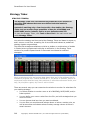
Find out how you would have done in the market if you had used a
particular technical strategy. The Strategy Tester is our backtesting tool
that combines technical analysis strategies with historical market data
to help you make future trading decisions.
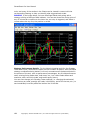
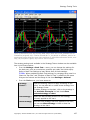
You can load results from the Strategy Tester into the Chart tool and
the Strategy Ticker® tool to help you find buy or sell opportunities in
real-time.
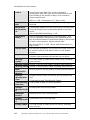
To open the Strategy Tester, click
in the Toolbar.
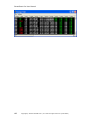
StreetSmart Pro® offers a comprehensive suite of tools that work in concert to
assist in providing a more user-friendly approach to technical analysis than is often
found in institutional trading software. If you use trading strategies based on
technical analysis principles or if you are interested in using back testing as part of
your stock selection process, the following tools aim to facilitate your efforts:
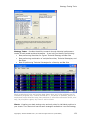
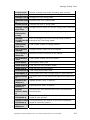
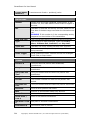
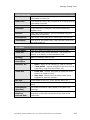
Strategy Center - At the heart of the Strategy tools is the Strategy Center, where
you create, save, and manage all the strategies you use in the Strategy tools. A
strategy consists of one or more indicators (such as a price crossover on Bollinger
Bands, Moving Average, Envelope, etc.) with an associated trade action (such as
Long Entry, Short Exit, etc).
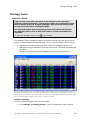
The information you get from each strategy depends on what tool you apply it in.
For example, applying a strategy in the Strategy Tester tool or in a Chart will apply
the strategy for a certain period of time going backwards to see how well the
selected strategy would have performed historically for a stock or list of stocks.
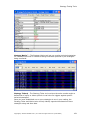
Whereas in the Strategy Ticker and Strategy Matrix, the strategies are applied to
real-time data in order to flag occurrences of the selected strategy crossing
whatever threshold is set by the strategy.
The Strategy Center is accessible from any of the Strategy tools or from your
Charts.
178
Copyright © Charles Schwab & Co., Inc. 2006. All rights reserved. (0106-5667)