1
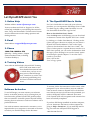
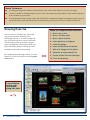
Welcome to DynaSCAPE! This Quick Start guide will show you how to get started quickly with DS|Design, perform the basic tasks you need to create a simple design and help you understand how this software can help you build your business. More information about the software can be found in the Training DVD videos that accompany the software and the DS|Design User’s Guide. You can also download an electronic version of the DS|Design User’s Guide from a link on the installation CD. Installation Important: Before you start, check you computer to ensure it meets the system requirements: System Requirements: Windows XP® , Windows Vista® or Windows 7® (32-bit and 64-bit) operating systems 1 gigahertz (GHz) 32-bit (x86) or 64-bit (x64) processor 1 gigabyte (GB) of system memory (RAM) 512MB video card with support for DirectX 9 graphics Minimum screen resolution of 1024 x 768 pixels Microsoft Internet Explorer® 8 or later Internet connection (updates and access to the online plant database) Note: Microsoft Office Suite® 2000 (or later) is required for advanced functionality such as creating material lists (Microsoft Excel® Microsoft Excel®). Adobe Reader® is required for advanced functionality such as creating Plant Picture Catalogues. Installing DS|Design To install DS|Design follow these steps: Step 1: Insert the DS|Design Install CD Step 2: Click on the Install DS|Design option Step 3: Type in your Name, Company Name and the serial number provided to you with the install CD (type the serial number exactly as it is presented with no spaces) Step 4: Begin the installation and allow it to finish. Once finished, click on the DynaSCAPE icon on your desktop to activate your software so you can get started using DS|Design. 2 DynaSCAPE Software Did You Know? The Windows Setup (installation) program automatically creates a program group and appropriate program icons for the application. The installation routine will also create shortcut icons for DS| Design on your Desktop. If you need help... If you experience any difficulties during installation please call us at 1.800.710.1900