1
User’s Guide
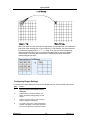
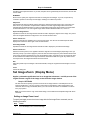
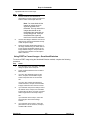
Hint: To enable you to measure the object and background pixel intensity values more easily, you can
zoom in on the area where you want to make your measurements. After you zoom in, you should notice
an almost subtle difference between the object and the background close to where the object and
background meet. You should also notice a line of pixels that define a distinct boundary between the
object and the background. It is within the object and background pixels that are closest to the boundary
line of pixels in which you want to make your measurements.
See Also: The Adaptive Background Correction™ system
Count Nuclei (Apps Menu)
Identifies and isolates cell nuclei through image segmentation and logs image data for
count nuclei to an associated log file.
Availability: Exclusive to MetaMorph and MetaXpress
Drop-in: Countnuclei
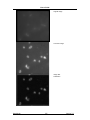
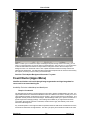
Use this application module to segment images that are used to identify and differentiate cell nuclei. The
segmentation labels each isolated and identified nucleus as a different color index to enable you to see a
visual separation between nuclei that are close or touching. Source images must be 16-bit images. This
application module produces 16-bit result images. Default settings enable you to produce a result from a
typical image without changing settings. Three settings are available to you: Approximate minimum
nuclei width, Approximate maximum nuclei width, and the minimum gray level intensity of the nuclei
above the local background.
Any nuclei-like pattern in the image less than the specified minimum width will be considered to be noise,
and will be excluded from the segmentation. The value you specify for the maximum width can be used
MetaMorph
789
Version 7.0