1
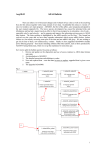
2. The set of round and square buttons below the table are designed to help
in some editing tasks. You must be careful to remember the sequence of
operations since it is different from that on personal computers.
Activate the appropriate button, position the mouse text cursor or drag
over required digits, press the return key on the keyboard to complete
the sequence.
3. The Default round button is the reset to normal editing mode. The Delete
button allows deletion of the value in a box, leaving an empty box; the
Remove button allows deletion of a value with the column then being
pushed up; the Insert button creates a new empty box, pushing the
column down. These buttons stay active until you click Default.
4. The Copy and Paste round buttons operate for the next immediate action
only.
5. Square buttons have a continuing effect until an alternative is pressed.
The Row_skip button causes a jump to the next editable box in a row
when the return key on the keyboard is pressed; Column_skip causes
jumping to next box in a column. Scroll up moves the whole window
down. Note that the window only shows ten values in a column, but the
whole table may be longer that this.
6. Preferred Temperature units for working with may be chosen. Changing
units causes the Inputs from the file to change to the new units. It does
not change any Output values already typed in. It merely interprets
Output values in the selected units.
7. Press the Done button to record the changes and return to the screen
from which Table Editor was initiated. The Cancel button prevents the
new values being substituted on return.
ADAS-EU Course
8-16 Oct. 2009 IPP Garching