1
Simple Paging Solution - User Manual
Table of Contents
1 Introduction
4
1.1 About this document
4
1.2 About the Barix Simple Paging Solution
4
1.3 Features
4
2 System Overview
5
2.1 System diagram
5
2.2 System components
5
2.3 Supported hardware
6
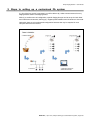
3 Steps to setting up a customised PA system
7
4 Getting Started
8
4.1 Connecting the devices
8
4.2 Making your frst announcement from a fxed Paging Head
4.2.1 Paging from PS1
4.2.2 Paging from PS16
8
8
8
4.3 Make your frst announcement from an iPhone or iPad
4.3.1 Prerequisites
4.3.2 Connecting to the system.
4.3.3 Paging from iDevice
9
9
9
9
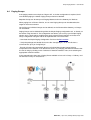
4.4 Paging Groups
10
4.5 Zone Names and IDs
4.5.1 Explaining Paging Zone Names and IDs
4.5.2 Assigning Zone Names and IDs with the confguration tool
11
11
12
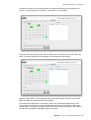
4.6 Setting up Paging Groups
12
4.7 Secure mobile paging: set a password on the Gateway device
15
4.8 Paging to a Group
15
4.9 Integration with Background Music and Emergency Notifcation systems
16
5 Using Simple Paging
17
5.1 Making Announcements
17
5.2 System Feedback
17
6 Simple Paging App options
18
6.1 Multiple Paging Group profles
18
6.2 Detailed status drilldown
18
6.3 Paging to Group(s) in 'Warning' state
19
6.4 Changing the default IP address and Port used for the audio messages
19
6.5 Limitation
19
7 Simple Paging Confguration Tool features
20
BARIX AG | 1. Apr. 2015 | | Page 2/35