1
2
R. B. Findler and M. Flatt
(plus a DVI/PostScript/PDF viewer). Usually, the results are not as aesthetically pleasing
as PowerPoint slides, and not as finely tuned to the problems of projecting images onto a
screen. Moreover, novice users of TEX-based systems tend to produce slides with far too
many words and far too few pictures, due to the text bias of their tool. Meanwhile, as a
programming language, TEX leaves much to be desired.
Slideshow, a part of the PLT Scheme application suite (PLT, n.d.), fills the gap left by
abstraction-poor slide presentation systems. First and foremost, Slideshow is an embedded DSL for picture generation, but it also provides direct support for step-wise animation, bullet-style text, slide navigation, image scaling (to fit different display and projector
types), cross-platform consistency (Windows, Mac OS, and Unix/X), and PostScript output
(for ease of distribution).
Functional programming naturally supports the definition of picture combinators, and
it enables slide creators to create new abstractions that meet their specific needs. Even
better, the Slideshow programming language supports a design recipe to help slide creators
build and maintain animation sequences. Our design recipe guides the programmer from a
storyboard sketch to an organized implementation, and it also suggests how changes in the
sketch translate into changes in the implementation.
Even with the best of programming languages, some slide sequences can benefit from a
dose of WYSIWYG construction. WYSIWYG tools should be part of the slide language’s
programming environment—analogous to GUI builders for desktop applications. We have
implemented extensions of the DrScheme programming environment that support interactive slide construction in combination with language-based abstraction.
Section 2 is a tour of Slideshow’s most useful constructs. Section 3 presents the Slideshow
design recipe for picture sequences. Section 4 explains Slideshow’s core implementation.
Section 5 briefly addresses practical issues for rendering slides on different media and
operating systems. Section 6 describes our prototype extension of DrScheme.
2 A Tour of Slideshow
A pict is the basic building block for pictures in Slideshow. Roughly, a pict consists of
a bounding box and a procedure for drawing relative to the box. Ultimately, a slide is
represented as a single pict to be drawn on the screen.
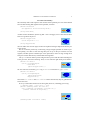
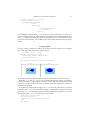
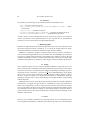
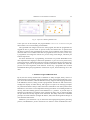
This section demonstrates how to use Slideshow primitives to generate slides like the
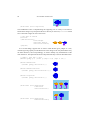
following, which might appear in a presentation about how fish gain weight when they eat
other fish.
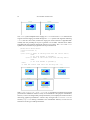
Food Chain
Yikes!
7 lbs
10 lbs
Current total weight: 17 lbs
After big fish eats little one: 17 lbs