1
Map Options
Moving Around a Map
5.2. Moving Around a Map
You can zoom and pan your map in the Map window. Use the options of the Map tab on the
Ribbon depending on your needs and explanations below.
The Zoom group includes the following options:
Figure 5-5. Zoom group
Zoom in increases the scale of the map.
Zoom out decreases the scale of the map.
Full Extent extents the map to its default maximum size.
Previous Extent saves all previous map extents and goes back any times you want.
The Pan group moves the map up, down, right and left (see Figure 5-6). Click the appropriate
arrow to move the map in the direction indicated by the arrow.
Figure 5-6. Pan group
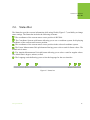
The Mouse Mode group includes the following options (see Figure 5-7):
Figure 5-7. Mouse Mode group. The Pan mode is on
Pan changes the mouse cursor to a hand and moves the map. Hold the mouse button down while
dragging the map in the desired direction, then release the button.
Zoom allows to use the mouse wheel for zooming the map. Move the mouse wheel forward/
backward to zoom in/out the map.
www.javad.com
45