1
Your Guide to SDIR ►
SECTION 2
SEARCH
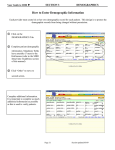
IF YOUR PATIENT IS NOT DISPLAYED
① Enter additional information
1
to narrow the search (e.g.,
enter Date of Birth-DOB)
2
1
1
2
② Click on “Search”
③ If your patient is still not
displayed, you will need
to create a new patient record. Proceed to the next
page, “How to Enter a
New Patient.”
③
If your patient is displayed, proceed to “If
Your Patient Is Displayed,” page 2.17.
Page 2.3
Section updated 05/09