1
Introducing MateCat .............................................................................................................................. 4
How MateCat Calculates Payable Words ................................................................................................. 4
Volume Analysis Page ..................................................................................................................................... 5
Supported browser, languages and formats .......................................................................................... 6
Translation Process ......................................................................................................................................... 9
Start working with MateCat ............................................................................................................. 11
MateCat Home Page and Login .................................................................................................................. 11
Creating Projects ............................................................................................................................................. 11
How To Upload File(s) for Translation .................................................................................................. 12
Translation Memory and Machine Translation .................................................................................. 14
Machine Translation Servers ..................................................................................................................... 15
Analysis Report ................................................................................................................................................ 16
Public Translation Memory and Translation Memory Key ........................................................... 20
TM backup and updates ............................................................................................................................... 21
How to add a Glossary .................................................................................................................................. 22
Translation Editor User Interface ............................................................................................................ 23
o
Top bar .................................................................................................................................................... 24
o
Bottom bar............................................................................................................................................. 28
o
Editor window ..................................................................................................................................... 26
Translation Toolbox ........................................................................................................................... 31
Manage your language resources ............................................................................................................. 31
Working Offline ............................................................................................................................................... 35
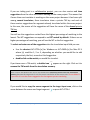
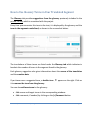
Using TM matches, MT suggestions and Glossary terms ................................................................ 36
How to Use Glossary Terms in Your Translated Segment ............................................................. 39
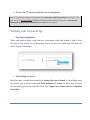
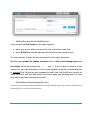
Working with Text and Tags ...................................................................................................................... 40
o
Tag autocompletion ........................................................................................................................... 40
Release 1.6 | www.matecat.com | info@matecat.com
Page 2