1
6.7 RECONNECT
Use the RECONNECT statement to remove a member record from one set
occurrence and connect it to another occurrence of the same set type, or to a
different position within the same set. To transfer a member record:
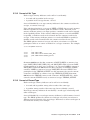
1. Use the FETCH (or FIND) statement to select a record in the set occurrence.
This can be either a member or an owner of the set occurrence you want to
connect to.
2. Use the FETCH (or FIND) statement with the RETAINING clause to transfer
the member record you want. This keeps the currency for the targeted record.
3. Execute a RECONNECT statement using the WITHIN clause.
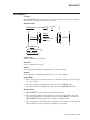
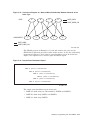
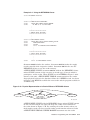
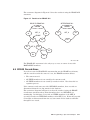
The RECONNECT statement is useful in applications such as production control
where manufactured items move down an assembly line from one work station to
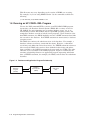
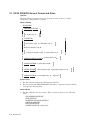
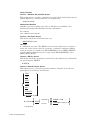
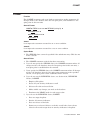
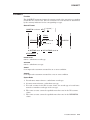
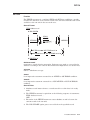
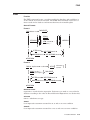
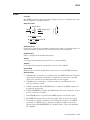
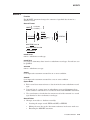
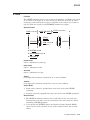
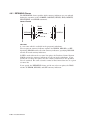
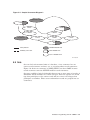
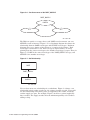
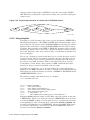
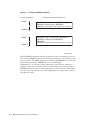
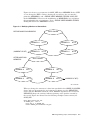
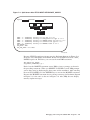
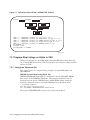
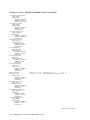
another. In Figure 6–5, work stations are the owner records and assemblies are
the member records.
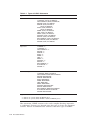
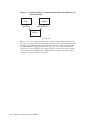
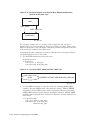
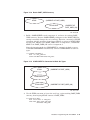
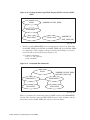
Figure 6–5 Occurrence Diagram Prior to RECONNECT
ASSEMBLY_SET
WORK STATION
1
ASSEMBLY E
WORK STATION
2
ASSEMBLY A
ASSEMBLY C
ASSEMBLY F
ASSEMBLY R
WORK STATION
4
WORK STATION
3
ASSEMBLY K
ASSEMBLY B
ASSEMBLY H
ASSEMBLY J
ZK−1513−GE
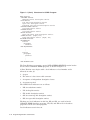
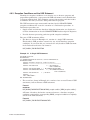
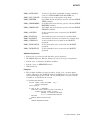
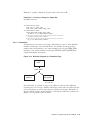
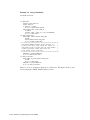
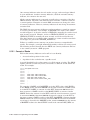
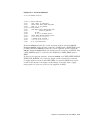
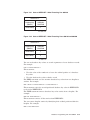
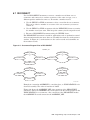
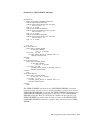
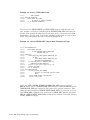
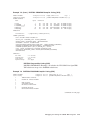
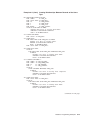
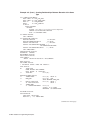
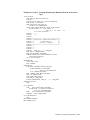
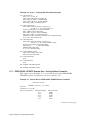
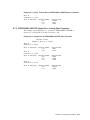
Example 6–3 transfers ASSEMBLY R, a machine base, to WORK STATION 2 for
electrical assembly. The order of insertion is LAST.
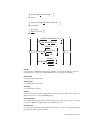
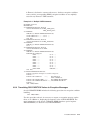
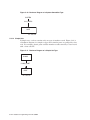
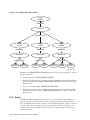
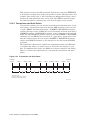
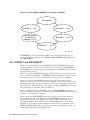
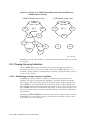
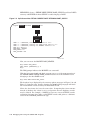
Figure 6–6 shows the ASSEMBLY_SET after execution of the RECONNECT
statement. Notice the ASSEMBLY A record replaces the R record’s position in the
WORK STATION 1 set occurrence. Also, execution of the RECONNECT makes
the ASSEMBLY R record current for the ASSEMBLY_SET.
DML Programming—Tips and Techniques 6–9