1
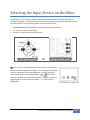
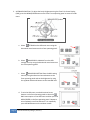
Selecting the Input Device on the Elmo Input devices (i.e. Elmo camera, laptop, and SD card) will be projected through the Elmo and out through the projector. Choose the device that you want projected by pressing the appropriate button on either the Elmo’s front operating panel or wireless remote control. CAMERA (default device projected): to project what is on the Elmo deck PC: to project what is on the laptop SD mode: to project pictures on the SD card OR Note: If you are switching devices on the Elmo, first check that the On Screen Display (OSD) menu is hidden. If it’s in display, hide the OSD menu by operating the front operating panel. Using the directional arrows on the Elmo’s front operating panel, select BACK on the OSD menu and then press the MENU/ENTER button on the front operating panel. Or on the wireless remote, repeatedly press the BACK button. This is the OSD menu in display mode. Educational Media Center | Leeward Community College Page 3