1
Quick Reference Guide
Installation
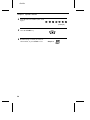
4. Enter your fax number (max. of 20 digits)
by pressing the number keys.
♦ If you make a mistake, press the
TEL
SET.
EXT
.
PHO
NE
HOLD/SEARCH key to move the cursor
back to the mistake, then enter the correct
number or letter. (To move the cursor forward, press the SPEAKER key.)
TEL
LIN .
E
START
5. Press the START key:
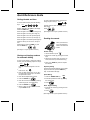
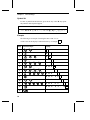
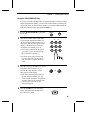
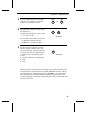
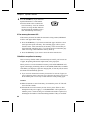
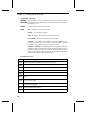
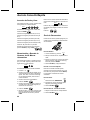
6. Enter your name by pressing the appropriate number keys as shown below. Press
each key one or more times until the desired letter appears in the display.
TEL
LIN .
E
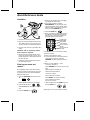
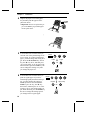
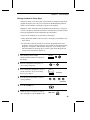
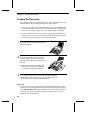
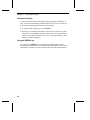
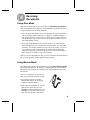
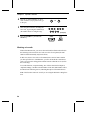
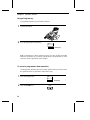
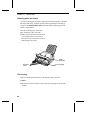
1. Connect the handset as shown.
2. Plug one end of the telephone line into the
TEL. LINE jack on the rear of the fax, and
the other end into your telephone wall jack.
ABC
1
GHI
4
PQRS
7
3. Plug the power cord into a grounded, 120 V
outlet.
Installation with an answering machine
and/or extension telephone
4. Remove the seal covering the TEL. SET
jack on the rear of the fax. Connect an extension telephone or answering machine to
the TEL. SET jack.
5. If desired, connect an extension phone to
the answering machine.
Entering your name and
number
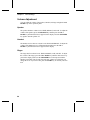
FCC regulations require your name and fax
number to appear on all documents you send.
To program your fax to do this automatically,
follow the steps below:
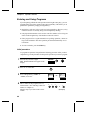
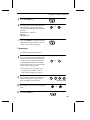
1. Press the FUNCTION key and then press
"3": FUNCTION
3
2
JKL
5
TUV
8
DEF
3
MNO
SPEED
DIAL
REDIAL
6
WXYZ
9
HOLD/
SEARCH
SPEAKER
0
Deletes highlighted letter
Upper/lower
case shift key
Moves cursor to
the left.
Moves cursor to
the right.
Press either key one or more times to select
and enter a symbol.
♦ Enter a space with the "1" key.
♦ To enter two letters in succession which require using the same key, press the
SPEAKER key after entering the first letter.
Example: To enter "ABZ Co.", press:
"2" twice for the letter A,
Press SPEAKER to move the cursor to the
right,
"2" three times for the letter B,
"9" five times for the letter Z,
"1" twice for a space,
"2" four times for the letter C,
Press REDIAL for a lower case letter,
"6" four times for the letter o,
"#" once for a period.
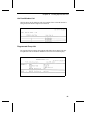
ENTRY MODE will appear in the display.
2. Press the "#" key twice:
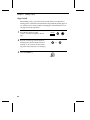
7. When finished, press the START key and
then the STOP key.
START
STOP
OWN NUMBER SET will appear in the display.
3. Press the START key:
START
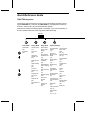
(See Pages 14-15 of your operation manual.)