1
570V-E3p-28p Page 19 Tuesday, February 13, 2001 1:42 PM
Appendix
PowerSaver
This monitor has a built-in power management system called PowerSaver. This system saves
energy by switching your monitor into a low-power mode when it has not been used for a
certain amount of time. The available modes are “On”, “Standby”, “Sleep”, and “Deep
Sleep”.
PowerSaver operates with a VESA DPMS compliant video card installed in your computer.
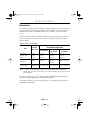
You use a software utility installed on your computer to set up this feature. See Table 4
below for details.
Table 4. Power-saving modes
State
Power-Saving Function mode
(EPA/ NUTEK / ENERGY 2000)
Normal
Operation
Standby Mode
Sleep Mode
Position A1
Deep Sleep Mode
Position A2
Horizontal Sync
Vertical Sync
Video
Active
Active
Active
Inactive
Active
Blanked
Active
Inactive
Blanked
Power
Indicator
Green
Amber
Amber Blinking Amber Blinking
(0.5 sec
(1 sec interval)
interval)
Power
Consumption
25W (Nom.) Less than 3W
Less than 3W
Inactive
Inactive
Blanked
Less than 3W
NOTE: This monitor automatically returns to normal operation when horizontal and
vertical sync return. This occurs when you move the computer’s mouse or press a key
on the keyboard.
This monitor is EPA ENERGY STAR ® compliant and NUTEK/ ENERGY 2000 compliant when
used with a computer equipped with VESA DPMS functionality.
For energy conservation, turn your monitor OFF when it is not needed, or when leaving it
unattended for long periods.
English
19