1
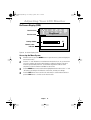
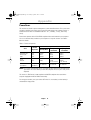
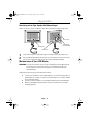
NOTE: This monitor accepts a 100mm x 100mm VESA-compliant mounting interface pad.
Rear cover
Mounting
Interface Pad
Hinge cover
VESA cover
1
2
Snap on the VESA cover (optional) or Hinge Cover back on the monitor Rear Cover.
Français
Attaching an Arm-Type Stand or Wall Mount Hanger
Español
Appendix
English
3_760Vbody.FM Page 23 Tuesday, April 24, 2001 11:58 AM
Align the Mounting Interface Pad with the holes in the Rear Cover and secure it with
the four screws that came with the Arm-type Stand or Wall Mount Hanger.
WARNING: To avoid risk of electric shock, do not disassemble the monitor cabinet (except
for gaining access to the cable connectors as described on page 6). Users
cannot service the monitor. User maintenance is restricted to cleaning as
explained below:
Deutsch
Maintenance of Your LCD Monitor
English
23
Italiano
To clean your LCD Monitor screen, lightly dampen a soft, clean cloth with water or
mild detergent. If possible, use a special screen cleaning tissue or solution suitable
for the antistatic coating.
To clean the monitor cabinet, use a cloth lightly dampened with a mild detergent.
Never use flammable cleaning material to clean your LCD Monitor or any other
electrical apparatus.
Portuguese
Unplug the monitor from the power outlet before cleaning.