1
Quick Reference Control Operation
•
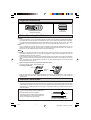
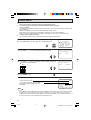
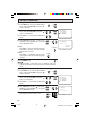
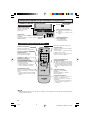
Part Names
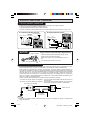
VIDEO/AUDIO IN 2 TERMINALS
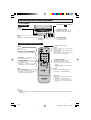
Front Panel
POWER
Press → On.
Press again → Off.
CHANNEL UP/DOWN
(a) Selects next higher channel.
(s) Selects next lower channel.
MENU
Press → Accesses MAIN MENU.
Press again → Exits MAIN MENU.
REMOTE CONTROL
SENSOR
VOLUME UP/DOWN
(k) Increases sound.
(l) Decreases sound.
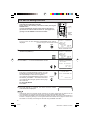
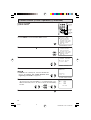
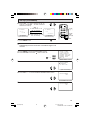
Basic Remote Control Functions
Infrared Transmitter Window
POWER
Press → On.
Press again → Off.
INPUT
Press → Switches to external video
INPUT 1 mode.
Press twice → Switches to external video
INPUT 2 mode.
Press 3 times → Switches back to the
original TV mode. See page 32.
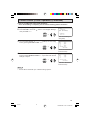
REMOTE KEYPAD
Accesses any channel from keypad.
FLASHBACK
Returns to previous channel.
CHANNEL UP/DOWN
(a) Selects next higher channel.
(s) Selects next lower channel.
• See pages 27–29 for Channel
Setting.
• Moves the “ E ” mark on the MENU
screens.
VOLUME UP/DOWN
(k) Increases sound.
(l) Decreases sound.
• Changes or selects the TV
adjustments on On-Screen Displey.
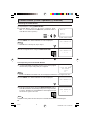
MUTE
Press → Mutes sound.
Press again → Restores sound.
• When sound is muted, CLOSED
CAPTION appears if available.
MENU
Press → Accesses MAIN MENU.
Press again → Exits MAIN MENU.
TV
DISPLAY
Press → Displays receiving channel for
4 seconds.
Press again → Removes display.
• Temporarily displays receiving
channel when in Closed Caption
mode.
Note:
• The TV set and remote control illustrations and the on-screen displays in this manual may differ from their actual
appearance.
7
27C241
7
Dimension: 140mm x 215mm