1
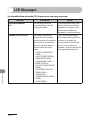
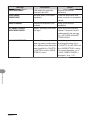
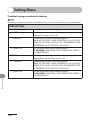
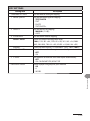
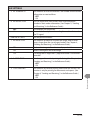
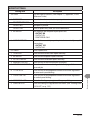
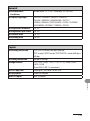
REPORT SETTINGS
Setting Item
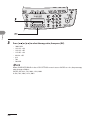
1. SETTINGS
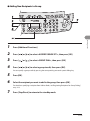
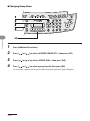
1. TX REPORT
Description
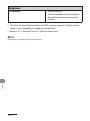
Sets the report functions. (See Chapter 11, “Appendix,” in the
Reference Guide.)
Sets whether the transmission report prints out.
PRINT ERROR ONLY
Prints a report only when a transmission error occurs.
OUTPUT NO
No report is printed.
OUTPUT YES
Prints a report every time you send a document.
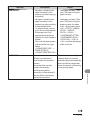
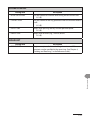
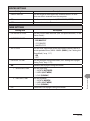
2. RX REPORT
Sets whether the reception report prints out.
– OUTPUT NO
– OUTPUT YES
– PRINT ERROR ONLY
3. ACTIVITY REPORT
Sets whether an activity report is printed automatically every 60
transactions.
– OUTPUT YES
– OUTPUT NO
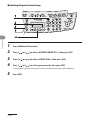
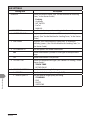
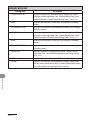
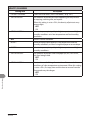
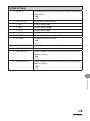
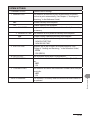
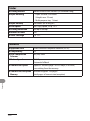
2. LIST PRINT
Prints reports/lists.
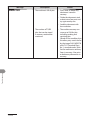
Prints the fax transmission report manually.
2. RX REPORT
Prints the fax reception report manually.
3. ACTIVITY REPORT
Prints the fax transaction report manually.
4. MEMORY DATA LIST
Prints the list of the reserved jobs in memory.
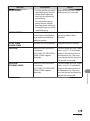
5. MEMORY IMAGE PRNT
Prints the information and image of the first page of the
reserved job.
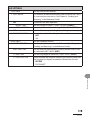
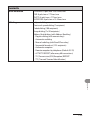
6. 1-TOUCH LIST
Prints the list of fax/telephone numbers and names registered
for one-touch speed dialing.
7. CODED DIAL LIST
Prints the list of fax/telephone numbers and names registered
for coded speed dialing.
8. GROUP DIAL LIST
Prints the list of groups registered for group dialing.
9. USER DATA LIST
Prints the setting list registered in the menu. (See “Printing USER
DATA LIST,” on p. 12-2.)
12-17
Machine Settings
1. TX REPORT