1
6
Getting Started
To install USB drivers on a Mac
7
ArcSoft Software
ArcSoft Software
The FlexCam USB is compatible with Mac OS 8.6 through OS X.
1. Insert the USB Software and Driver Disk into the CD-ROM drive.
2. Double-click the ArcSoft icon to open the CD content window.
The USB Software and Driver Disk includes two programs for video capture and
editing: VideoImpression 1.6 and PhotoStudio 5 (PhotoStudio 4 on the Mac).
Please note that the VideoImpression 1.6 version on this CD is manufactured
specifically for ClearOne products and may therefore differ from the standard
version of Video Impression 1.6. Both products have built-in help systems to help
you make the most of your video and still captures.
Installation
To install on a Windows OS
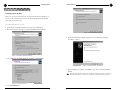
1. Right-click the ArcSoft CD icon and select Explore.
2. Double-click Setup.exe.
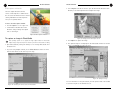
Figure 6. Contents of USB Software and Driver CD
3. Double-click the USB Camera folder to open it. Then, double-click on the
folder that corresponds with your operating system.
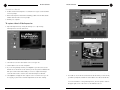
Figure 9. Installing the ArcSoft programs
Figure 7. Contents of USB Camera Folder
4. Double-click the FlexCam USB 2.0 Installer. When
the drivers are installed, restart the computer.
3. Follow the onscreen prompts. Both programs are installed through the same
installation wizard.
5. Plug the USB cable into a USB port on the Mac.
4. Restart your computer.
Figure 8. Installer icon
Technical Services Group ~ 1-800-283-5936 (USA) ~ 1-801-974-3760
Technical Services Group ~ 1-800-283-5936 (USA) ~ 1-801-974-3760