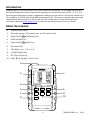
1
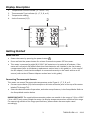
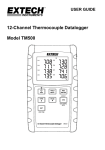
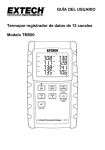
Display Description 1. 2. 3. 4. Temperature Channel number (1 – 8 or 9 – 12) Thermocouple Type indicator (K, J, T, E, R, or S) Temperature reading Units of measure (C/F) 2 1 K CH1 CH5 CH2 CH6 CH3 CH7 CH4 CH8 3 F 4 Getting Started Power ON‐OFF Power the meter by pressing the power button . Press and hold the power button for at least 3 seconds to power OFF the meter. This meter is powered by eight (8) 1.5VDC ‘AA’ batteries or by optional AC adaptor. If the meter will not switch ON please check that fresh batteries are installed in the rear battery compartment (refer to the battery replacement section later in this guide) or, in the case of the AC adaptor, check that the adaptor is connected correctly to the meter and to an AC source (refer to the AC Power Adaptor section later in this guide). Connecting Thermocouple Sensors This meter can accept Thermocouple temperature probe Types K, J, T, E, R, or S. Connect up to twelve (12) thermocouples to the sub‐miniature jacks at the top of the meter labeled T1 through T12. Select the desired mode of operation, and other setup features, in the Setup Mode. Refer to the Setup Mode section below. IMPORTANT NOTE: The supplied thermocouple probes are useable in the range of ‐20 to +250°C (‐4 to +482°F) only; even though the meter can display temperature values outside of this range. For measuring outside of the range specified here, please obtain thermocouples rated accordingly. 3 TM500-EU-EN v1.1 12/13