1
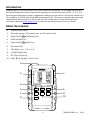
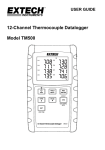
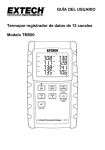
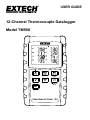
Introduction Congratulations on your purchase of the Extech TM500 Thermometer, an SD Logger Series meter. This meter displays and stores temperature readings from up to twelve (12) Type K, J, T, R, E, or S thermocouple temperature probes. Logged data readings are stored on an SD card for transfer to a PC. In addition, an RS232 port allows data streaming to a PC. This meter is shipped fully tested and calibrated and, with proper use, will provide years of reliable service. Please visit the Extech Instruments website (www.extech.com) to check for the latest version of this User Guide. Meter Description 1.
Thermocouple inputs 2.
DC power adapter , SD memory slot, and PC interface jack 3.
Power ON‐OFF and Backlight key 4.
HOLD and NEXT key 5.
Power ON‐OFF and ESC key 6.
REC and ENTER 7.
TYPE ▲ key (K, J, T, R, E, or S) 8.
LOGGER (Offset) key 9.
SET (Time Check) key 10. PAGE ▼ key (Display T1‐8 or T9‐12) 1
K
3
CH1
CH5
CH2
CH6
CH3
CH7
CH4
CH8
2
F
4
5
7
ESC
HOLD
NEXT
REC
ENTER
TYPE
PAGE
LOG
VIEW SAMPLE
9
6
OFFSET
RATE
SET
8
10
VIEW TIME
12-Channel Thermocouple DataloggerTM500
2
TM500-EU-EN v1.1 12/13