1
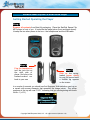
[Note: if the player goes into battery-save mode and the screen goes blank
just quickly slide up the power switch as in Step 3 above to revive screen.]
Step 4
Press the Play /
Pause
button
to
initiate playback
You should now be hearing a voice announcing the beginning of the Empower
Walk Product Introduction.
Step 5
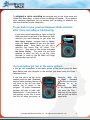
If needed, adjust the
volume
with
the
Volume Up / Down
rocker switch on right
side of the player
Step 6
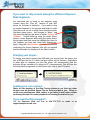
Clip
the
player
to
your waist or
pocket with
the
spring
clip located
on the back
When you are finished listening for the day or for the moment, power off your
player by performing the following:
Step 7
To power off the
player simply slide up
the spring loaded power
switch for 2 full seconds
until you see the
SanDisk logo followed
by “Goodbye”
Copyright 2008 Empower Walk, LLC – all rights reserved (Version 1.0)
2