1
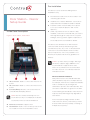
Mounting Tips
Please read the next sections, “Power Options” and
“Network and Power Installations” to choose an
Follow these tips for the best results.
installation option that works best with the system
1
before installing the Door Station.
Install the Door Station in a place where it will be
protected from water. For interior use only.
2
Do not expose the Door Station to direct
Power Options
sunlight.
3
Find the best location for the Door Station. See
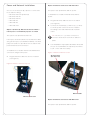
CAUTION! Do not attempt to use PoE, AC, and
the Door Station Back Box Installation Guide for
DC power at the same time. Choose only one
back box installation.
power option.
a
b
4
Mount the Door Station where the video
camera is aimed at an average person’s
ATTENTION! Ne pas tenter d’utiliser PoE,
height so the person in the same building has
AC et DC en même temps. Choisir une seule
a good view of the person calling in.
option d’alimentation.
Mount the Door Station so that the caller
can comfortably speak into the microphone
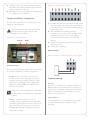
The Door Station can be powered using one of these
(about two (2) feet away or 60 cm).
three (3) options:
Control4 does not recommend using wireless
(WiFi) networking for a Door Station mounted
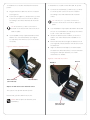
• Power over Ethernet (PoE). The Ethernet
outside your dwelling. If you must use WiFi,
network connection for the Door Station is
however, follow these guidelines:
provided through the PoE Injector. No additional
• The wireless access protocol (WAP) broadcast to
the interior location must be strong.
• Use Composer Pro’s System Manager to test the
wireless signal after you’ve installed the Door
wiring is needed.
• AC or DC. Used to power the Door Station when
using an Ethernet (not PoE) or WiFi network
connection.
Station, and then verify that the signal works
correctly. See the Composer Pro User Guide for
NOTE: Ethernet cable. Install the ferrite clamp
details.
on the Ethernet cable inside the back box.
Network Options
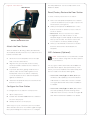
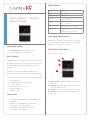
Backlit Button Indicator
The Door Station can be connected using one of
The Door Station button’s light can be turned on or
these network types:
off depending on what is required for the installation.
• Standard Ethernet. For best results, this is the
preferred option. Connect the Door Station to
The backlit button may make it easier to see the
the RJ-45 LAN port on using the RJ-45 Ethernet
button if it is dark inside the structure. Normally, the
cable.
light on the button remains on or off depending on
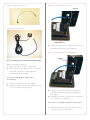
• WiFi. The WiFi antenna will communicate with
the LAN’s WAP. If the LAN has a WAP set up, no
how it is configured in the system, however, it is also
used to convey device status during certain times.
additional wiring is needed except for power. See
“WiFi Antennas” for details.
When the device is first powered on, the button will
blink slowly until the device is ready to be used in
IMPORTANT! (1) Control4 recommends to use
the system. If the button continues to blink slowly
an Ethernet connection rather than WiFi for
for over three (3) minutes, then the device may
the best communication with the Control4
be experiencing a problem and should be factory
system. (2) WiFi requires an antenna (sold
restored. During a factory restore process the button
separately).
will blink rapidly.
3