1
Unison Programming Guide
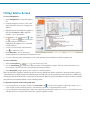
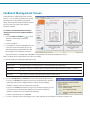
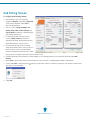
In Situ Audiogram Screen
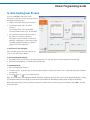
If you chose In Situ in step 8, the in situ
audiogram screen will load and a pop-up window
will appear reminding you to:
1. Plug the vent in the hearing aid or earmold.
2. Use the appropriate earhook for BTE
products:
• Use a filtered earhook for Moda BTEs.
• Use an unfiltered earhook for all other BTEs.
3. Also be sure the hearing aids fit properly in
the client’s ear. If there is already an
audiogram saved in the Noah or Standalone
database, it will appear on the screen in grey.
The white displayed area will show the test
range for the in situ audiogram.
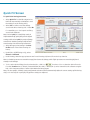
To perform an in situ audiogram:
The in situ audiogram can be performed in one
of two modes: Autoplay or Manual.
To use Autoplay Mode (default):
1. Move the mouse to the desired point in the audiogram (R or L) and click. The tone will be generated automatically.
2. Repeat at each frequency to obtain all desired in situ data.
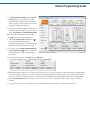
To use Manual Mode:
1. Turn off the Autoplay checkbox.
2. Use the mouse to “point and click” on the audiogram display or use the drop down boxes to select the desired test frequency
and intensity.
3. Use the
icon or
icon to present the tone.
Note: To use the new In Situ audiogram data for the fitting calculation, check the box “Use In Situ audiogram for fitting”. Leaving
this checkbox blank will cause Unifit™ to revert to the original Noah (or Standalone) audiogram for the fitting calculations.
When leaving the In Situ screen, you will be prompted to save the new in situ audiogram to the database. Select OK to save the
in situ audiogram.