1
Precautions
● Hold the AC power plug by the head when removing it
from the wall socket, as pulling the lead can damage
internal wires.
● The AC power plug is used as a disconnect device
and shall always remain readily operable.
● Do not remove the outer cover, as this may result in
electric shock. Refer internal service to your local
SHARP service facility.
● The ventilation should not be impeded by covering the
ventilation openings with items, such as newspapers,
tablecloths, curtains, etc.
● No naked flame sources, such as lighted candles,
should be placed on the apparatus.
● Attention should be drawn to the environmental
aspects of battery disposal.
● This unit should only be used within the range of 5°C
- 35°C (41°F - 95°F).
Warning:
The voltage used must be the same as that specified on
this unit. Using this product with a higher voltage other than
that which is specified is dangerous and may result in a fire
or other type of accident causing damage. SHARP will not
be held responsible for any damage resulting from use of
this unit with a voltage other than that which is specified.
■ General
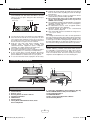
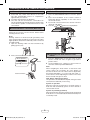
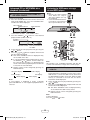
● Please ensure that the equipment is positioned in a
well ventilated area and ensure that there is at least
10 cm (4”) of free space along the sides and top of
the equipment.
10 cm (4”)
10 cm (4”)
● Use the unit on a firm, level surface free from vibration.
● Place the unit at least 30 cm (12”) away from any CRT
TV to avoid colour variations across the TV screen. If
the variations persist, move the unit further away from
the TV. LCD TV is not prone to such variation.
● Keep the unit away from direct sunlight, strong
magnetic fields, excessive dust, humidity and
electronic/electrical equipment (home computers,
facsimiles, etc.) which generate electrical noise.
● Do not place anything on top of the unit.
● Do not expose the unit to moisture, to temperatures higher
than 40°C (104°F) or to extremely low temperatures.
● If your system does not work properly, disconnect
the AC power lead from the wall socket. Plug the AC
power lead back in, and then turn on your system.
● In case of an electrical storm, unplug the unit for safety.
■ Volume control
The sound level at a given volume setting depends on
speaker efficiency, location, and various other factors.
It is advisable to avoid exposure to high volume levels.
Do not turn the volume on to full at switch on. Listen to
music at moderate levels. Excessive sound pressure from
earphones and headphones can cause hearing loss.
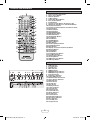
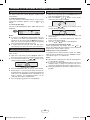
Controls and indicators
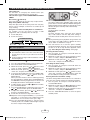
1
23
5
6
7 8 910
12 14
13
11
4
■ Front panel
1.
2.
3.
4.
5.
6.
7.
8.
9. Tuning Up, CD/USB Track Up, iPod/iPhone Skip Up
10.Disc/USB/iPod/iPhone Play or Pause Button
11.Disc/USB Stop Button
12.FUNCTION Button
13.Disc Compartment Open/Close Button
14.On/Stand-by Button
Disc Compartment
Timer indicator
Remote sensor
Docking Station for iPod or iPhone
Headphone Terminal
USB Terminal
Volume buttons
Tuning Down, CD/USB Track Down, iPod/
iPhone Skip Down
DK-KP82PH_OM_EN_SCA.indd 2
2013-02-26 07:33:14