1
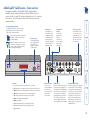
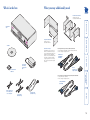
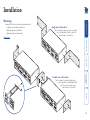
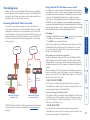
Configuration Initial configuration...................................................................15 Part 1 – Local configuration..................................................15 Encryption settings............................................................17 Hot plugging and mouse restoration..............................18 Resetting the configuration ............................................19 Part 2 – Remote configuration..............................................20 Operation Connecting to the AdderLink IP Gold.......................................28 Local connection....................................................................28 Remote connections..............................................................29 Remote connection by VNC viewer..................................30 Remote connection by Web browser...............................30 Using the viewer window.....................................................31 The menu bar....................................................................31 When using the viewer window......................................31 Mouse pointers..................................................................32 Configure...........................................................................32 Auto calibrate .............................................................33 Re-synchronise mouse .................................................33 Access mode - shared/private ..........................................33 Power control....................................................................33 Controls..............................................................................34 Contents - page 2 Mounting......................................................................................6 Connections..................................................................................7 Host computer links: Keyboard and mouse...........................7 Host computer links: Video.....................................................8 Host computer links: Audio.....................................................9 Host computer links: Adder Virtual Media............................9 Local console connections: Keyboard and mouse...............10 Local console connections: Video.........................................11 Local console connections: Audio.........................................12 IP network port......................................................................12 Modem/ISDN port..................................................................13 Power supply connection......................................................13 Power control port................................................................14 Installation Networking issues......................................................................21 Positioning AdderLink IP Gold in the network....................21 Placing AdderLink IP Gold behind a router or firewall..21 Placing AdderLink IP Gold alongside the firewall...........23 Power switching configuration.................................................24 The KVMADMIN utility..............................................................25 Performing a flash upgrade.......................................................26 Flash upgrade using the remote method.............................26 Flash upgrade using the ‘dip switch’ method......................27 AdderLink IP Gold features - front and rear...............................4 What’s in the box.........................................................................5 What you may additionally need................................................5 Introduction Contents 1