1
EZ SETUP during First Use
•
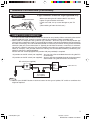
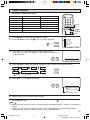
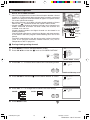
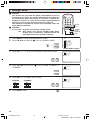
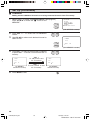
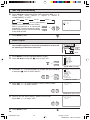
When you turn on the TV for the first time, it will automatically
memorize the broadcasting channels.
Please perform the following instructions before pressing the
POWER button.
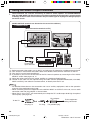
(1) Insert the batteries into the remote control. (See page 5)
(2) Connect the antenna cable to the TV set. (See pages 6, 7)
(3) Plug in the AC POWER cord to the wall outlet.
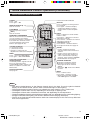
POWER
TV
DVD
VCR
DISPLAY
INPUT
1
2
3
4
5
6
7
8
VOLUME
(k)/(l)
9
ENTER
FLASHBACK
0
PERSONAL PREFERENCE
A
B
C
D
CH
VOL
—
VOL
+
CH
MENU
1
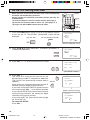
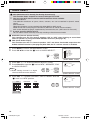
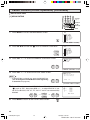
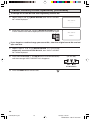
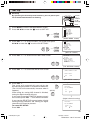
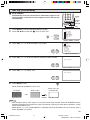
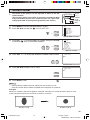
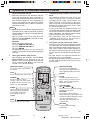
Press the POWER button on the TV set or on the Remote Control
to turn on the TV. The SELECT LANGUAGE screen will be
displayed.
(On the Set)
POWER
MUTE
CHANNEL
UP (a)/
DOWN (s)
SEL ECT LANGUAGE
ENGL I SH
ESPA Ñ OL
FRANCA I S
(On the Remote Control)
POWER
SEL ECT : CH /
SE T
: VOL+ / –
TV
(SELECT LANGUAGE screen)
2
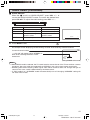
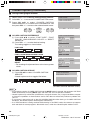
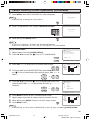
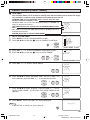
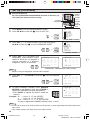
Press CH a/s to select “ENGLISH”, “ESPAÑOL (SPANISH)” or
“FRANCAIS (FRENCH)”.
SEL ECT LANGUAGE
ENGL I SH
ESPA Ñ OL
FRANCA I S
CH
CH
3
SEL ECT : CH /
SE T
: VOL+ / –
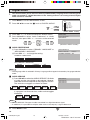
Press VOL k/l to access the EZ SETUP screen.
CONNECT ANTENNA OR CABL E.
START EZ SETUP?
VOL
—
STOP
VOL
+
START
(EZ SETUP screen)
4
(START)
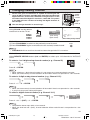
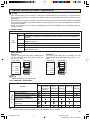
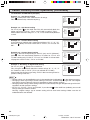
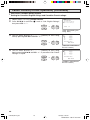
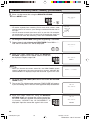
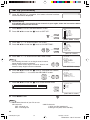
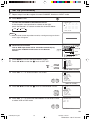
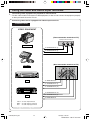
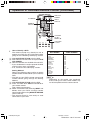
Press VOL k.
The tuner will automatically search for the
VOL
+
broadcasting or cable TV channels for ANALOG.
(The CH No. will automatically increase when it
(STOP)
appears.)
Once tuning for analog broadcasting channel is
VOL
—
finished, tuning for digital channel will start.
If you want to stop the EZ SETUP process once it
has started, press VOL l and it will be canceled.
If you stop the EZ SETUP process before it finish
tunning analog channels, the tunning for digital
channels will started to process.
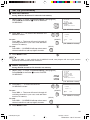
If you want to SET UP again, please refer to page
33, 34 on SET UP.
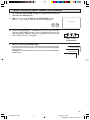
To cancel EZ SETUP
Press VOL l.
(Analog channel tunning)
PL EASE WA I T
AUTO PROGRAMM I NG
69
STOP
START
↓
(Digital channel tunning)
PL EASE WA I T
AUTO PROGRAMM I NG
D I G I TAL
69
STOP
START
10
27SF560(10-12).p65
10
26/10/05, 5:34 PM
Dimension: 140mm x 215mm