1
Changing Viewing Channel
•
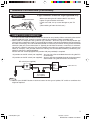
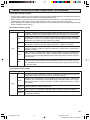
Please note: your new Television is capable of receiving the full
range of AIR-TV channels available today, from the most advanced
digital channels, to the more traditional analog channels. As the
transition toward full digital TV continues, some AIR-TV systems
in the USA will have a mixture of analog and digital channels in
their lineups.
2
3
4
5
6
7
8
REMOTE
KEYPAD
9
FLASHBACK
ENTER
FLASHBACK
0
PERSONAL PREFERENCE
A
B
C
CHANNEL
UP (a)/
DOWN (s)
D
CH
VOL
—
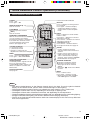
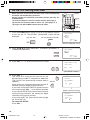
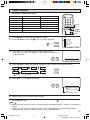
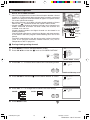
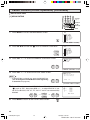
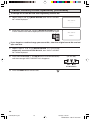
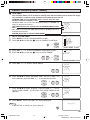
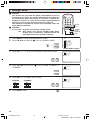
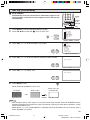
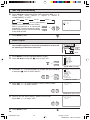
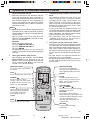
H You can change channels in several ways.
Method 1
Using CH a/s on the remote
control unit or on the TV set.
1
VOL
+
CH
(On the Set)
10
ANALOG
I D0 1
TV - PG DL SV
4:3
DIGITAL
10.1
AUDIO: ENGLISH
CH
MENU
button
CH
STEREO
SAP
MONO
(while viewing
digital channel)
ON A I R
ON A I R
(while viewing analog channel)
Method 2
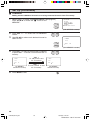
(i) Press FLASHBACK to switch to the previously tuned channel.
(ii) Press FLASHBACK again to switch back to the currently tuned channel.
FLASHBACK
Note:
• FLASHBACK will not work if no channel has been changed after TV is turned on.
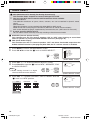
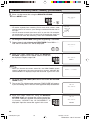
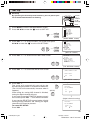
Method 3
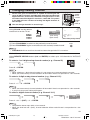
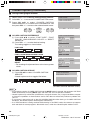
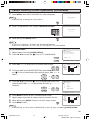
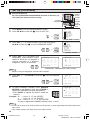
Using REMOTE KEYPAD buttons (0-9 and ENTER) to select up to 125 channels for VHF/UHF/
CATV.
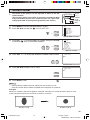
To select a 1 or 2-digit analog channel number (e. g., Channel 5):
5
5
1
2
4
5
7
8
3
6
9
ENTER
0
Press 5 → ENTER
Note:
• When selecting a 1-digit channel number, it is not necessary to press 0 before the number.
• When you enter 0-9 only, channel selection will be made if there is no operation for a few seconds.
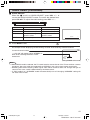
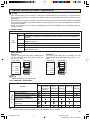
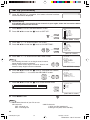
To select a 3-digit analog channel number (e. g., Channel 115):
1
11
115
Press 1 → 1 → 5 → ENTER
Note:
• When you enter 0-9 only, channel selection will be made if there is no operation for a few seconds.
• If you push “0” by itself, nothing will happen.
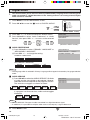
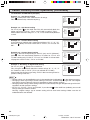
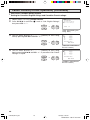
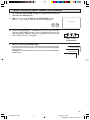
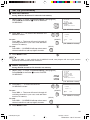
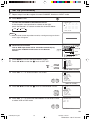
To select a digital channel number (e. g. Channel 10.1):
1
10
10.
10.1
DIGITAL
10.1
AUDIO: ENGLISH
Press 1 → 0 → • (DOT) → 1 → ENTER
Note:
• Complete the above steps within a few seconds.
• When you enter 0-9 and • (DOT), channel selection will be made if there is no operation for a few
seconds.
13
27SF560(13-15).p65
13
26/10/05, 6:55 PM
Dimension: 140 X 215 mm