1
Video Connections
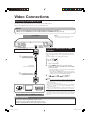
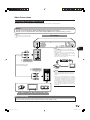
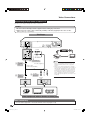
Connecting to the HDMI Terminal
You will enjoy high quality digital picture and sound through the HDMI terminal.
When you use AQUOS LINK, make sure to use a certified HDMI cable.
STEPS
1: Be sure to turn off this Player and the equipment before making any connections.
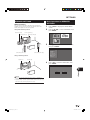
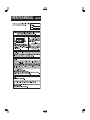
2: Firmly connect an HDMI cable (commercially available) to the HDMI terminals (1 and 2).
Caution:
• HDMI output and Component Video output
can not be used at the same time.
This Player
Change the video output to HDMI
video out
• When using an HDMI output, 7.1 ch
Digital Output is available.
When you connect both an HDMI cable and a component
cable to this player, switch to the output terminals by remote
control.
(The video output is not output both terminals.)
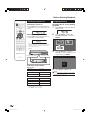
1 To HDMI OUT terminal
1
2
HDMI cable
(commercially available)
2
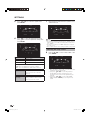
Turn on the power.
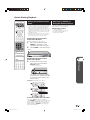
Press HDMI button for 5 seconds, and the
change of “Component Video Out” and “HDMI
Out” is possible.
• (To switch outputs, it is necessary to keep the button
pressed for several seconds.)
Also, when the HDMI button is pressed, the current
setting conditions will display while flashing (blinking),
and then the selected output lamp displays.
To HDMI input terminal
3
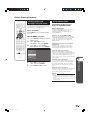
“
” or “
” is displayed
alternately on the front panel display.
NOTE
• When you connect this player to a SHARP TV with an HDMI cable
only and if the TV is on, the video output is changed to HDMI
output automatically.
The following setting is unnecessary.
• When you connect to the TV with an HDMI cable only, HDMI video
output is set to AUTO. If you don’t get the normal image, select
the desired resolution.
• When you are setting HDMI video output besides AUTO, you can
only select the resolution that corresponds to the connected TV.
Projector
TV
AV receiver
Equipment with an HDMI terminal
Caution:
• Even when there is no cable connected to the Component video out,
switching the output to CP-out (Component video out) is still possible.
When CP-out is selected, there will be no signal from the HDMI
video out.
After connecting
• Load a disc and start playback. (Pages 24-27)
• If desired, connect audio equipment. (Pages 17-19)
• Refer to AQUOS LINK function. (See page 23 and 40)
14
BD-HP20U_en_c.indd 14
2007/10/03 13:01:12